PPC Cleaning
Tracking PPC Cleaning — and Who's Left Without a Set
Know whose structure gear is away, how long cleaning really takes, and which members are waiting without a usable set — so a request for more sets comes with numbers attached.
Sending structure PPC away for cleaning is the right thing to do, and the cleaning itself takes as long as it takes. Where it gets hard is at the station end. Gear goes off in a bag and the only record is someone's memory. A member asks when their set is coming back and nobody's quite sure when it left. And a member with only one set is off the truck for structure calls until it does.
Most of the time this isn't anyone's fault — it's just that nobody can see it. The people allocating sets are working from what they're told, and without dates and numbers, “we're often short” is hard to act on. ReadyRoom keeps a simple, dated record of every set sent away and returned, so the brigade and the people who support it are looking at the same picture.
Whose gear is away, right now
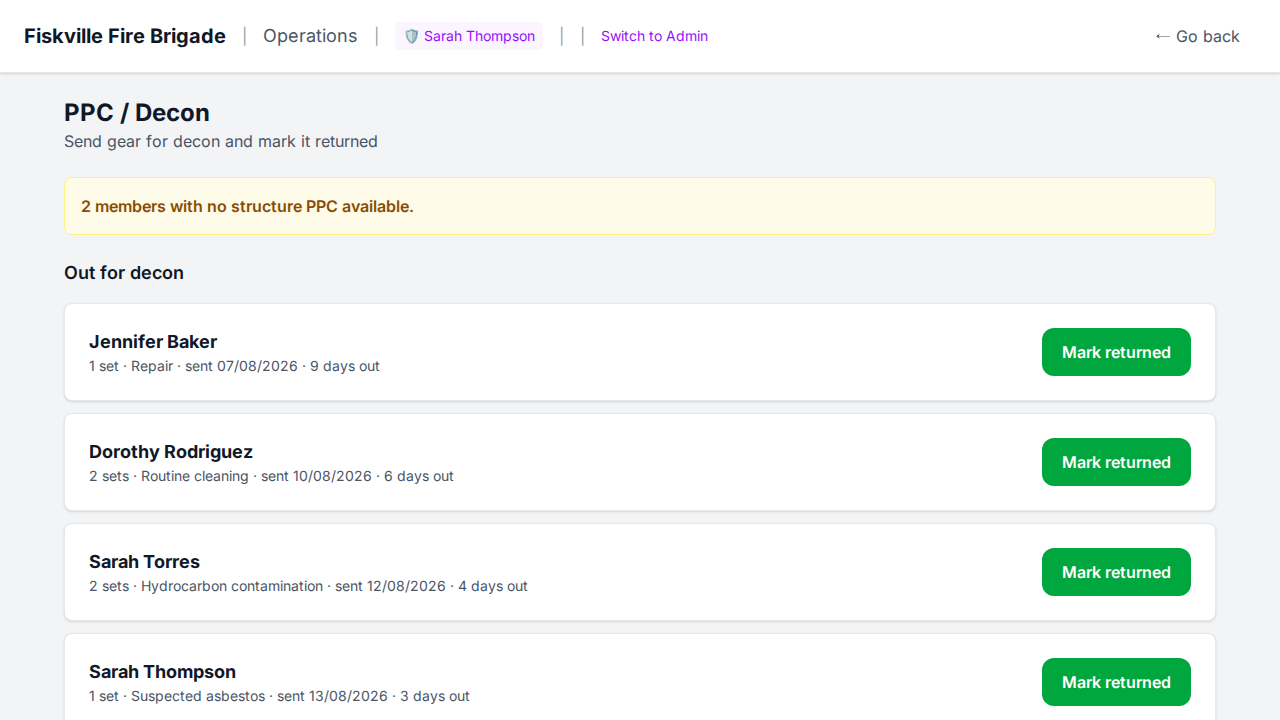
When a set goes off for cleaning, whoever's at the station records it on the ops panel in a few taps — the member, how many sets, and why. When it comes back, one tap marks it returned. Nobody has to keep a spreadsheet up to date.
- Record sets sent away for routine cleaning, repair, hydrocarbon contamination, or suspected asbestos
- See everything that's still away, with the sent date and how many days it's been out
- Each member's allocation is recorded, so ReadyRoom knows how many usable sets they have left
- A banner up top shows how many members have no structure PPC available at all
- Works on the station tablet, so it gets recorded when the bag goes out the door
How long cleaning actually takes
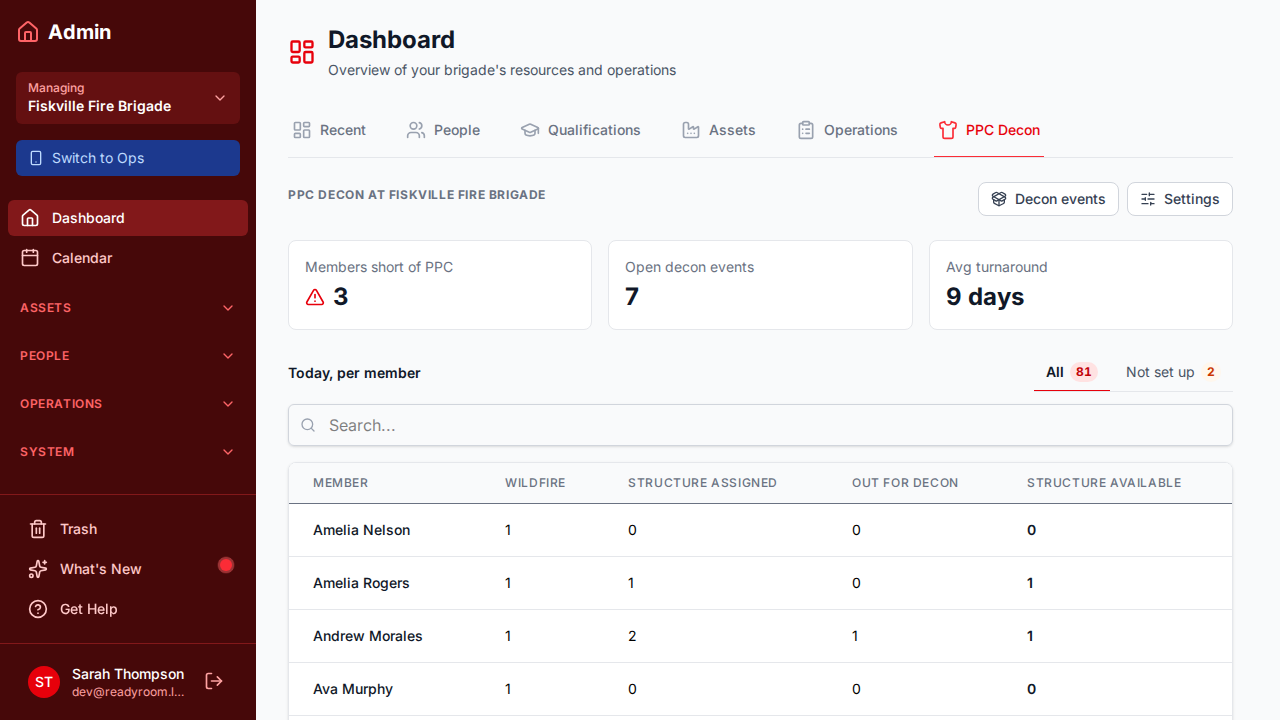
Ask around the station and you'll get a range of answers on turnaround — some sets seem to come back quickly, others seem to take forever. Once sends and returns are recorded, nobody has to guess. The admin dashboard works out the average turnaround from every returned set, alongside how many are still out.
- Average turnaround in days, worked out from real sent and returned dates
- Open decon events at a glance, with the full list a click away
- Filter the history by what's still away and what's come back
- A per-member table of allocated sets, sets away, and sets available
Who's been waiting without a set
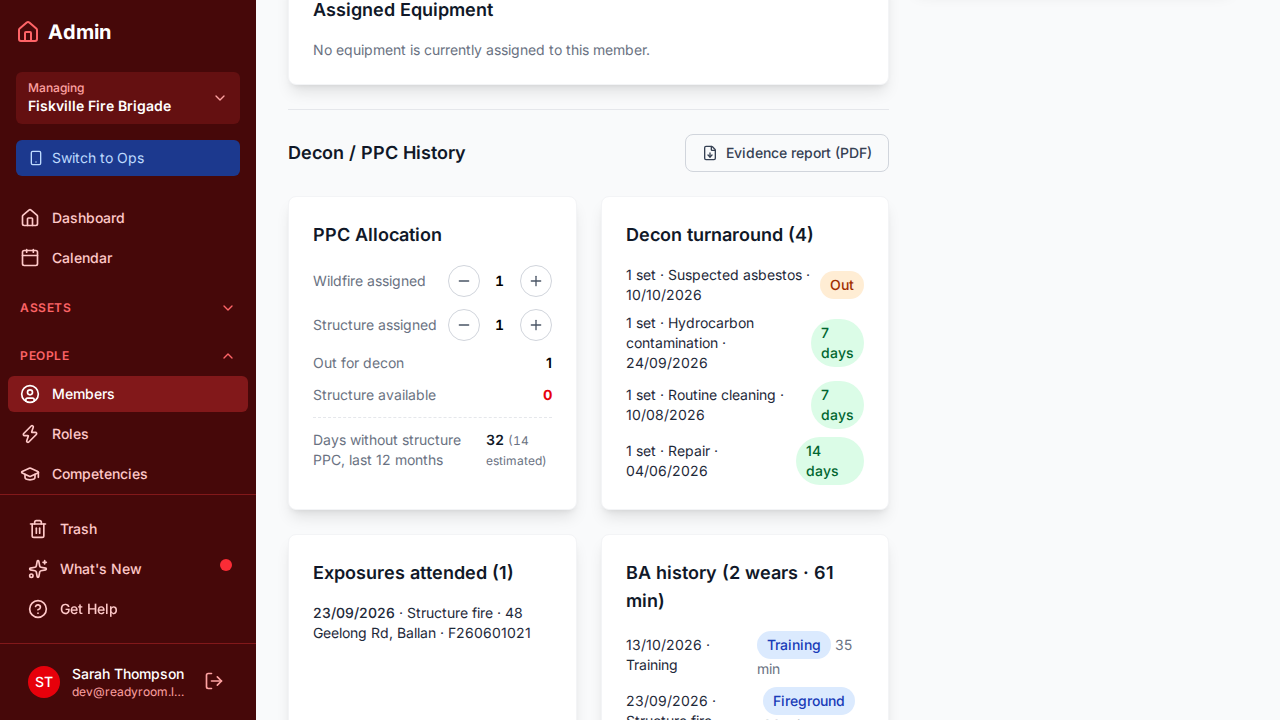
Turnaround on its own doesn't tell the whole story. Two weeks away matters a lot less for a member with three sets than for one with a single set. ReadyRoom flags the members who have nothing usable left, and keeps a dated history for each member, so you can see how often it happens and for how long.
- Members with no structure set available are flagged on both the ops panel and the dashboard
- Each member's Decon / PPC History tab shows every set sent and returned, with dates
- Single-set members who keep ending up without gear stand out over a season
- Per-member PDF reports for any date range, ready to attach to a request
Building the case for more sets, together
Everyone involved wants members on the truck in clean gear, and requests for extra sets go further when they're backed by more than anecdote. With a season of records behind you, a brigade can show which members spent time without a usable set, how long turnaround tends to run, and where an extra set would make the biggest difference — a constructive conversation built on shared facts, rather than a complaint.
More use cases
Training Plans
Learning Pathways Members Can Navigate Themselves
Map the progression from new recruit to advanced qualification, and let members see where they sit, what they've finished, and what they're eligible to start next.
Member Health
Your Brigade's Engagement Targets, Not Someone Else's
Set the standards that actually fit your brigade, and give your management team an early, fair picture of who's still engaged — while a quiet word can still make the difference.
Hose Repair
Running a Hose Repair Service for Your District
If your brigade repairs hoses for the district, ReadyRoom runs the whole loop — the district lodges the job, your members work the counter, and the year's report writes itself.
Equipment Audits
Confirming Who Still Holds Which Pager or Radio
Long-running audits that check assigned equipment is still where the register says it is — recorded by auditors themselves on the ops panel.
Data Ownership
Export Your Data — It's Yours, Not Ours
Take a complete copy of your brigade's data — spreadsheets, full JSON, documents, and photos — in a single archive, whenever you want it.
Contamination Tracker
Auditable Exposure Records for Presumptive Legislation
Capture every fireground exposure in a tamper-evident record so members' histories stand up under presumptive cancer legislation.
Equipment Management
Tracking Member-Assigned Pagers and Radios
Always know who holds which pager, radio, or piece of personal kit — and recover it when members move on.
Compliance
Section 29–Ready Asset Register Exports
Keep a complete register of appliances and equipment and export it on demand for CFA Section 29 inspections.
Roster & Events
Keeping Rosters Fair Across the Crew
Fairness tracking shows how shifts are spread across members so the load stays balanced and transparent.
Put ReadyRoom to Work for Your Brigade or Group
Get your brigade, group, or unit set up in minutes — we'll help you every step of the way.